Showing posts with label Ethernet over Power. Show all posts

Monday, November 12, 2012

Moving to Ethernet over Power


It has been awhile since I last posted, been busy with other commitments.
In this post, I would like to share some recent modifications I made to my home networking.
Motivation
The original intention was to improve the Wifi performance at home. 
Originally, my laptop (in the study) is covered by the living room's Wifi coverage. 
Whenever I watch online TV or backup its files, my whole place's Wifi connection grinds to a halt. Also, the iPad is rendered useless.
The logical approach would be upgrading all my devices to 802.11n, but it is quite a substantial investment considering my laptop is a four years old Sony VAIO and I still use my iPhone 3GS, both supporting  only 802.11g. 
Also, I tried enabling DLNA on a 802.11n smartphone and streamed it to the WDTV media player. It just repeatingly halted. 
I felt there has to be a better option. 
Setup and two use cases
In large, there are three areas being connected: living area (wifi router), study and the storage room. The idea is to dedicate the Wifi signals to the portable devices (e.g. iPad, iPhone with no SIM).
In parallel, all the "non-internet" traffic are to be carried across the home's power line.
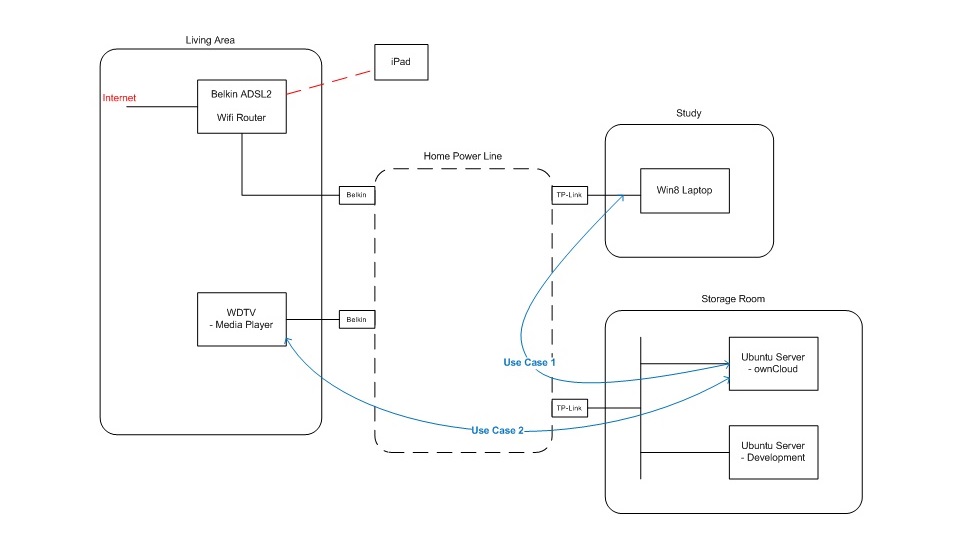
  • (1) For example, I am using ownCloud to backup my photos and personal documents from my laptop (as illustrated by the blue line, "Use Case 1")
  • (2) Likewise, if I would like to display my photos on the LED TV via WDTV media player, then I can share it from either my Laptop or ownCloud (DLNA enabled) – once again, all traffic through the Power line ("Use Case 2".
While all these happen. I can still use my iPad to happily browse the internet (red line), simply because the Belkin Wifi Router is not involved in these use cases.
Some details
If you look at the diagram more closely, there are several small boxes attached to the “Home Power Line” cloud in the center. These are the EoPs' plugs. Their models are Belkin Powerline AV (F5D4070) and TP-Link TL PA-201 respectively. 

This Belkin's support page article describes powerline adapters compatibility. By large, there two standards in the market today. HP 1.0 and HP AV. 

My working combination of Belkin and TP-Link are running on the older Home Plug 1.0 standard. This standard supports up to 85Mbps throughput. 

Originally, I bought a newer pair of Belkins Homeplug AV running on HPAV standard. Unfortunately, these newer plugs cannot detect other HP1.0 devices over the power line.

Further technical details
  • The people on Whirlpool forum have done a much better job than myself analyzing Ethernet over Power products available in the market. It’s worth a read if you are considering using it for your home.
  • I am no electrical engineer, but I do suspect my results may have to do with multiple phases and circuits, as detailed in this Intellon Whitepaper. Cross phase coupling is still good technical information.

Glad to hear what you think or your experiences.

Friday, January 21, 2011

Cost Comparison between EoP versus Wifi

Background/ Requirements
I have moved home recently. There are two TV sets connected to a Western Digital Live Media Player and XBMC respectively. Both requires wired Ethernet connection to a Netgear wireless router located in a separate room, in order to access the internet:
The TV connected to XBMC is sitting in a different room. I am reusing the previously built solution DD-WRT Wifi client http://homeopensource.blogspot.com/2010/03/converting-wifi-adapter-into-80211g.html

This setup has proven to be quite reliable, although its throughput is only around 5Mbps. For example, copying a 1.36GB file (DVD) from my laptop to the XBMC takes around 37minutes.
While this is ample bandwidth for Standard Definition video streaming (and of course internet radio stations ~128kbps), the video quality degrades significantly when, say, I am using my laptop to access the internet. 


I would like to calculate the cost of setting up internet connection for the WD Media Player, connected to the second TV through HDMI. It is intended to stream High-Def contents so the bandwidth required will be higher than 11g. Also, I would prefer my YouTube videos being unaffected by wireless internet connection.

Wireless Connection (G/N Dual-Band)
Initially, I considered using g/n dual-band setup with the Access Point supporting both G and N clients simultaneously. A forum post indicates this setup works quite well (http://forums.whirlpool.net.au/archive/1226195) and should be able to support up to 80Mbps throughput - more than sufficient for HD streaming. There is only the additional cost of purchasing a 11n client with a Ethernet port, but unfortunately, they are hard to come by. As most of the commercially available wireless routers' firmware only allows the device to be configured as an Access Point, if I were to go for a wireless router, then it must support DD-WRT.

Ethernet over Power (EoP) 
This device essentially transmits data signal across the residential circuit using a different frequency band to that of electrical, in another words it acts bit like a frequency modulator. Its operation is straightforward, there is no software driver nor any configuration required, simply plug-and-play. I have managed to find an extensive review on TP-Link TL-PA201 EoP adapters (http://www.tp-link.com/products/productDetails.asp?pmodel=TL-PA201), along with its throughput performance http://www.vitocassisi.com/archives/790/6, which is quite similar to that of 802.11n.


Price Point
I searched www.msy.com.au, and found a DLink DIR-600 WirelessN router selling for $50.00, whereas the TP-Link TL-PA201 EoP adapter pair is selling for $109.00 - roughly $60.00 difference. The wireless solution is still significantly cheaper than the EoP adapter pair.


Conclusion

This analysis is rather preliminary in terms of its application (streaming video to TV). Consider when additional users require internet access. Most importantly, the smartphones definitely cannot benefit from a pure Network over Power setup. In another words, NoP effectively hinders internet mobility. This means a wireless router is needed nonetheless. Whereas in a pure wireless environment, we would see a degrade in performance as the number of devices grow, which is bad news for bandwidth sensitive IPTV applications.  


In summary, EoP shows lots of potential (e.g. ease of use, high-throughput, operates independently to wireless internet and no new wires across home required), but it is the pricing and limited application at this stage, that hinders its popularity. In fact, I see these two technologies complimenting each other more than one is better than the other.


Note: 
For those who are interested, please take a look at the FAQ for EoP on Netgear's website, it contains lots of good information including the recommended (maximum) number of EoP adapters, expected throughput etc...